
Guide
Move collateral only when the right wallet authority is connected.
Manage Collateral uses shared planning logic to distinguish agent-only trading from wallet-authorized funding and collateral movement. The route planner is deliberately strict because approvals, transfers, withdrawals, subaccounts, vault moves, and HIP-3 funding paths require wallet authority.
At a glance
- Authority
- Wallet required Collateral movement requires master or scoped wallet signing.
- Planner
- Shared Ticket budget, Manage Collateral, and submit preflight use shared funding planning.
- USDC
- 6 decimals USDC send amounts must be clamped to six decimals in live flows.
Why It Matters
What traders and researchers should take away
- Funding and collateral actions carry higher authority requirements than ordinary agent trading.
- The UI should make reconnect-scoped-wallet states obvious before a user tries to move funds.
- The docs preserve product safety rules without exposing private wallet or balance details.
How it works
What the product uses behind the scenes
- Wallet authority rules are documented in the local project rules and wallet linking model.
- The shared funding planner owns ticket budget, Manage Collateral, and submit preflight behavior.
- LI.FI embedded funding has a narrow live-proven source/destination route contract.
- Hyperliquid standard and per-DEX USDC movement uses explicit wallet-signed actions and precision constraints.
Notes
Things to know
- Stored agent keys are trading authority only and must not be treated as funding authority.
- Unknown Hyperliquid action types default to wallet authority.
- Collateral guide screenshots must use demo or redacted states.
Guide
Steps
- Open Manage Collateral
Open the collateral surface from the ticket or account workflow and verify the selected primary master wallet.
- Check wallet authority
Reconnect the scoped wallet if the session is email/Google-only or if the selected wallet is not available.
- Review the planned route
Confirm source, destination, amount precision, DEX scope, USDC route, and any required approvals before signing.
- Sign only funding actions intentionally
Collateral movement, approvals, withdrawals, vault moves, and subaccount transfers require wallet signing.
Safety
Before using this workflow
- Do not show live balances or wallet addresses in public docs.
- Direct spot to per-DEX USDC sends are not the standard live-proven route.
- Keep LI.FI source-chain/token allowlists narrow unless separately live-proven.
Next
Open the workflow
- Open Manage Collateral Review collateral controls from the terminal ticket workflow.
Screenshots
Real UI references
These are captured from Omni Terminal routes with public-safe state. Private balances, wallet secrets, access headers, and live private positions are not used.
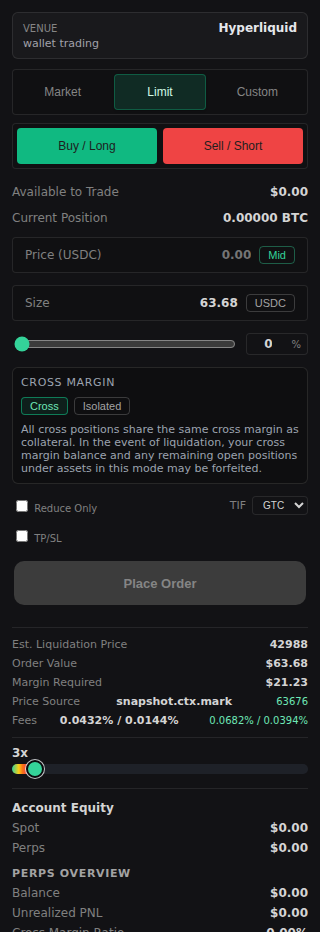
/terminal?symbol=BTC 2026-06-13 - docs-v1Authority boundary
Trading authority and funding authority are intentionally separate.
- Agent keys may place and cancel orders.
- Wallet signing is required for collateral movement, approvals, withdrawals, vault moves, subaccount transfers, and abstraction setup.
- The UI should block funding movement until the selected primary master wallet or scoped wallet is connected.
References
Implementation references
Wallet linking model
omni-terminal/docs/WALLET_LINKING_MODEL.mdDocuments Omni user-to-wallet ownership and account context.
LI.FI widget guide
omni-terminal/docs/LIFI_WIDGET_V4.mdDocuments the embedded funding widget integration and route constraints.