
Guide
Connect the right wallet before trading or funding actions.
Omni Terminal supports wallet and email/Google sessions, but wallet connection remains authoritative for ownership, signing, and funding actions. The chooser supports common injected wallets and WalletConnect while keeping session and wallet authority separate.
At a glance
- Wallets
- Injected + mobile The login surface can expose injected wallets and mobile wallet connection options.
- Session
- Host-scoped Sessions are resolved against the current host to avoid cross-host ambiguity.
- Funding
- Reconnect Funding actions are blocked until the selected primary wallet is connected.
Why It Matters
What traders and researchers should take away
- Choosing the intended wallet matters for account ownership and action authority.
- Email or Google sessions can trade with stored agents but still need a connected wallet for funding movement.
- Public documentation can explain the flow without showing real wallet addresses.
How it works
What the product uses behind the scenes
- Authentication routes own login and wallet verification.
- Wallet linking docs define the primary master wallet model and legacy compatibility.
- Playwright wallet harnesses verify injected-wallet chooser behavior without relying on real extension UI.
Notes
Things to know
- Never publish private keys, wallet seeds, API keys, or Cloudflare Access headers.
- Screenshots should use redacted or demo addresses.
- Wallet availability can vary by browser, mobile app, and extension setup.
Guide
Steps
- Open the login surface
Use the terminal login action or
/auth/loginto open the wallet connection flow. - Choose the intended wallet
Select MetaMask, Rabby Wallet, OKX Wallet, Coinbase Wallet, Keplr, or WalletConnect for the wallet that owns the Hyperliquid account you intend to use.
- Approve the session
Sign the login message and verify that the terminal shows the expected account context.
- Reconnect for funding when needed
If funding or collateral controls ask for a scoped wallet, reconnect the selected primary wallet before signing.
Safety
Before using this workflow
- Do not reveal wallet seeds or private keys.
- Confirm the wallet row before signing.
- Use redacted addresses in documentation images.
Next
Open the workflow
- Connect Wallet Open the login flow.
Screenshots
Real UI references
These are captured from Omni Terminal routes with public-safe state. Private balances, wallet secrets, access headers, and live private positions are not used.
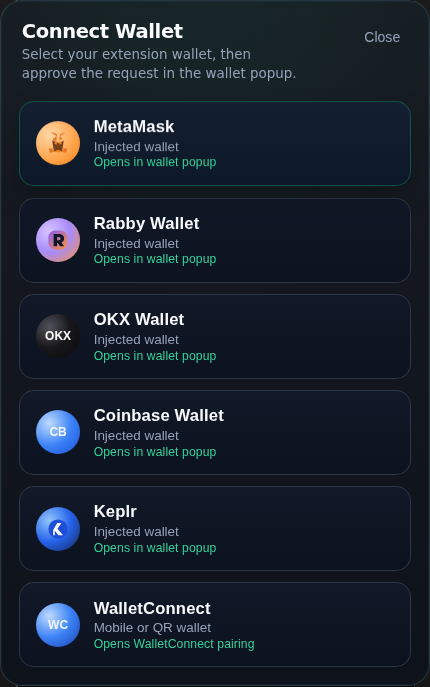
/auth/login 2026-06-13 - docs-v1Session expectations
Wallet login and app session state are related but not the same thing.
- Wallet signing proves account ownership for login.
- Email/Google sessions may still require wallet reconnection for funding actions.
- Host-scoped sessions avoid dev/prod cookie ambiguity.
References
Implementation references
Wallet testing guide
omni-terminal/docs/WALLET_PLAYWRIGHT_TESTING.mdDocuments the repeatable wallet chooser and injected-provider test harness.
Wallet linking model
omni-terminal/docs/WALLET_LINKING_MODEL.mdDocuments user, wallet, and Hyperliquid account relationships.