
Guide
Build order ladders with size, price, and account checks visible.
Scaled orders live under Custom > Scale in the order ticket. They let traders plan multiple price levels with start/end prices, level count, size skew, spacing skew, and an optional chart preview, but every level still needs review before submit.
At a glance
- Workflow
- Multi-level Plan entries or exits across several levels instead of one ticket price.
- Review
- Per level Each ladder row should be checked before submit.
- Safety
- Sizing Total notional and reduce-only state matter more than any single row.
Why It Matters
What traders and researchers should take away
- Scaled orders can reduce manual ticket repetition when planning entries or exits.
- A visible ladder makes total exposure easier to review before submit.
- Public docs can explain the workflow without showing private positions or balances.
How it works
What the product uses behind the scenes
- Order ticket behavior lives in the terminal UI and shared funding/order planning helpers.
- Hyperliquid signing and submit flows preserve wallet/account authority boundaries.
- Live order smoke tests validate payload inspection, cancellation, and cleanup for real runs.
Notes
Things to know
- Scaled order examples are illustrative and not suggested trade setups.
- Always review total notional, reduce-only state, and price spacing.
- A demo screenshot should not contain live private account data.
Guide
Steps
- Open a market and ticket
Select the market, confirm account scope, and open the ticket mode that exposes scaled order controls.
- Add ladder levels
Switch to Custom > Scale, then set the start price, end price, level count, size skew, and spacing skew.
- Review total exposure
Check aggregate notional, collateral impact, reduce-only state, and whether the ladder matches the current market.
- Submit only after confirmation
Use the final confirmation as the source of truth before placing orders on a live account.
Safety
Before using this workflow
- Confirm whether orders are opening, closing, or reduce-only before submit.
- Use tiny/passive live validation only in smoke tests with cleanup.
- Do not use private positions in documentation screenshots.
Next
Open the workflow
- Open Scaled Ticket Open BTC in the terminal and review ticket controls.
Screenshots
Real UI references
These are captured from Omni Terminal routes with public-safe state. Private balances, wallet secrets, access headers, and live private positions are not used.
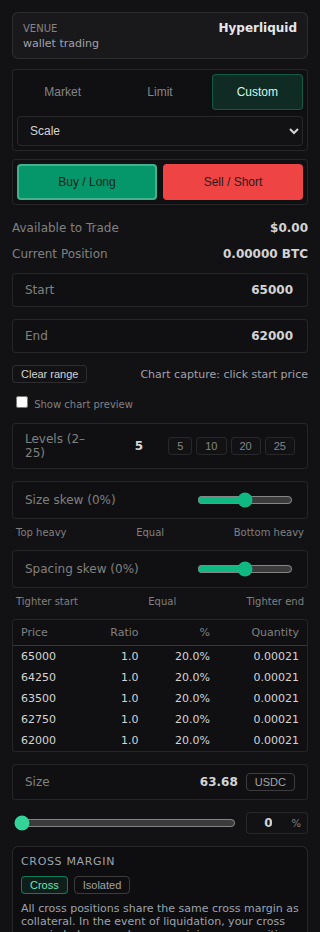
/terminal?symbol=BTC&ticketMode=scaled 2026-06-13 - docs-v1Scaled order review checklist
The main risk in scaled orders is missing the aggregate effect.
- Review every generated row and total notional together.
- Check side, reduce-only behavior, price spacing, start/end direction, and whether the chart preview matches the intended range.
- Cancel or adjust stale levels when market context changes materially.
References
Implementation references
Order-ticket live smoke guidance
omni-terminal/AGENTS.mdDocuments live validation expectations for order ticket changes.
Funding planner
omni-terminal/src/lib/funding/hlFunding.tsShared planner used by ticket budget and collateral preflight.